1. What makes Processing a great language to learn and use.
Processing is a great lanugauge to learn and use because it is open source, which means that there is a lot of source code available for use, which is useful for beginners. Also, the programs can be made with simple codes and syntax, to make something visually appealing and unique.
2. What is Open Source?
Open source software is software code that is available for anyone to take and use. This includes and modifications and enhancements to the code.
3. What is Creative Commons?
Creative Commons is a concept and organization that allows the sharing and use of creativity and knowledge through the use of 'free legal tools'.
Monday, January 5, 2015

Saturday, November 29, 2014
Day 1 Arduino Homework
1.
Name and speed of the Processor for Arduino Uno.
-The name of the Processor is "ATmega328" and its speed is 16MHz.
2. What is the amount of RAM?
-The amount of RAM is 2KB, but it is not exactly RAM, but SRAM, which is Static Random Access Memory.
3. What is the language C good for?
-C is good for expressing common ideas, especially because it is simply and has been around for 30 years which means that there is a lot of source code. C is also good for performance and speed. Major parts of operating systems like Windows are still written in C. Lastly, it is good for both the user and the computer as C is both user and machine oriented.
4. What is the difference between analog and digital inputs? When would they be used?
-One of the differences between analog and digital would be the method of output. Analog outputs information physically, just like the hands would on an analog clock, whereas actual discrete values are outputted on a digital clock. Furthermore, Analog uses a range where it can sometimes be difficult to get the actual output, whereas on something Digital, you can get the exact output. They can be used in many different situations, like on a weight scale, a clock, or in the dashboard of a car. Specifically, a thermometer can be analog and PC's can be digital.
5. What is a microcontroller (In your own words?)
-A microcontroller is a mini computer used to control the actions of systems in electronics. Microcontrollers can be found in things such as printers, toasters, and even aircraft systems. They typically include a processor, memory, and peripherals. The Arduino is often referred to as a microcontroller.
6. Post a good Youtube on our website giving us an intro example
https://www.youtube.com/watch?v=qReeCzS3ybY
-The name of the Processor is "ATmega328" and its speed is 16MHz.
2. What is the amount of RAM?
-The amount of RAM is 2KB, but it is not exactly RAM, but SRAM, which is Static Random Access Memory.
3. What is the language C good for?
-C is good for expressing common ideas, especially because it is simply and has been around for 30 years which means that there is a lot of source code. C is also good for performance and speed. Major parts of operating systems like Windows are still written in C. Lastly, it is good for both the user and the computer as C is both user and machine oriented.
4. What is the difference between analog and digital inputs? When would they be used?
-One of the differences between analog and digital would be the method of output. Analog outputs information physically, just like the hands would on an analog clock, whereas actual discrete values are outputted on a digital clock. Furthermore, Analog uses a range where it can sometimes be difficult to get the actual output, whereas on something Digital, you can get the exact output. They can be used in many different situations, like on a weight scale, a clock, or in the dashboard of a car. Specifically, a thermometer can be analog and PC's can be digital.
5. What is a microcontroller (In your own words?)
-A microcontroller is a mini computer used to control the actions of systems in electronics. Microcontrollers can be found in things such as printers, toasters, and even aircraft systems. They typically include a processor, memory, and peripherals. The Arduino is often referred to as a microcontroller.
6. Post a good Youtube on our website giving us an intro example
https://www.youtube.com/watch?v=qReeCzS3ybY
Friday, October 17, 2014
Thursday, September 11, 2014
New Technology/Invention
 What it does:
- Changes the license plate of your car
Problems it solves:
- Getting charged by 407 ETR and other tolls
- Getting in trouble for hitting a car. (If you hit a car, simply change license plate and drive away)
Data: License plate codes/numbers with different provinces or states.
Rules/Procedures: Use only during emergencies. Using buttons provided, enter in desired plate number and state/province. Once you have done that, you can get away with whatever it is you have done.
Users: Criminals, bad drivers, toll evaders.
Software: License plate options, fonts, states/provinces.
Hardware: Actual "plate" and buttons to change what plate says.
Sunday, September 7, 2014
Why Programming is one of the CORE skills of the 21st Century
With technology becoming more advanced, coding and programming is becoming more popular amongst many people. Technology is integrated into many industries and this is why programming skills are important. This is also especially because we are in the 21st century. Now, not all computer programmers are that stereotypical 'nerd', but computer programmers are now becoming more common as technology grows.
Even if you don't think it is necessary, programming has a role in almost every career you might go into. Computers are literally everywhere and you can not hide from them. Some can be very complex which is why programming skills are important.
Even if you don't think it is necessary, programming has a role in almost every career you might go into. Computers are literally everywhere and you can not hide from them. Some can be very complex which is why programming skills are important.
Human Computer Interface
1.
When were the first USER Interfaces
developed?
The first User interfaces were developed in the 1970's
2.
Who developed them?
Xerox PARC developed this Xerox Alto.
3.
What percentage of software development time is
spent on user interfaces
The average time spent during the design phase is 45%, 50% during the implementation phase and 37% during the maintenance phase.
4.
What makes a good interface?
A good interfaces consists of a lay-out that is easy to use, follow and navigate, attractive, and contains no bugs.
5.
Copy an image from a Linux and MAC GUI. What are
the main visual differences?


The main differences between the Mac (first picture) and the Linux is the format of the desktop icons. For the Linux, the icons are on the top left corner, whereas the icons for the Mac around along the bottom. Furthermore, the date/time bar on the Linux are on the bottom, while the Mac has it along the top.


Windows 3.1 - April 6, 1992
Windows 95 - August 24, 1995
Windows 98 - June 25, 1998
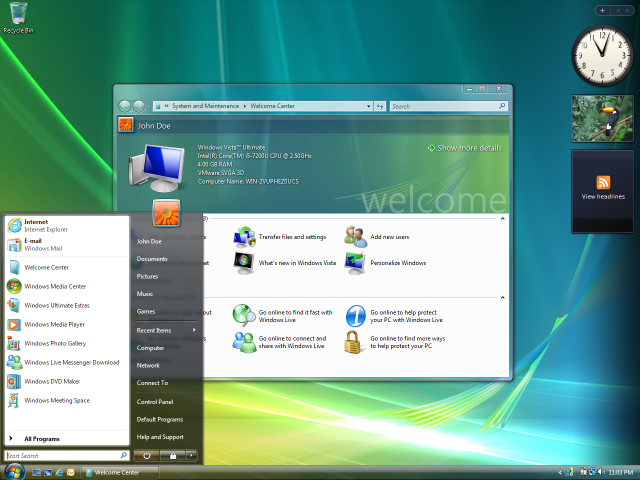
Windows Vista - January 30, 2007

Windows 7 - October 22, 2009
7.
What seems to be getting better as the years go
on?
As the years go on, user-friendliness is getting better. The designs are more attractive and easy to follow. The interface looks more organized and clear as less icons were put on the desktops as the years go on.
8.
What are the main goals of good
HCI?
The main goals of a good HCI is to allow the user to user the computer efficiently without any problems. A good HCI is simple, yet effective for the user.
9.
List 3 Universities that have
courses in HCI.
3 Universities that have courses in HCI are:
-University of Waterloo
-University of Michigan
-University of Manitoba
Thursday, September 4, 2014
Quantum Computing Playground
This page, talks about Quantum Computing, how it works and how it is different from the "classic" computer. A classic computer processes bits that can either be 0 or 1. However, quantum computers allows multiple interesting algorithms because they use qubits, which can exist in any superposition of 0 and 1 and are also represented by complex numbers. The website says that when N qubits are in superposition 2 states are created as opposed to 1 state which a class computer creates. This may sound complicated, but is considered a "basic property" of quantum computers.
Basic operations on quantum computers are defined by quantum gates. These gates allow the ability to build complex algorithms. Quantum gates are reversible which allows a program to execute both forward and reverse.
The actual site, Quantum Computing Playground, allows users to simulate quantum registers up to 22 qubits and run algorithms. The site also gives you examples that you can try including a step by step demonstration.
Basic operations on quantum computers are defined by quantum gates. These gates allow the ability to build complex algorithms. Quantum gates are reversible which allows a program to execute both forward and reverse.
The actual site, Quantum Computing Playground, allows users to simulate quantum registers up to 22 qubits and run algorithms. The site also gives you examples that you can try including a step by step demonstration.
Worst Passwords of 2013
Business Insider listed 25 of the worst passwords that were used in 2013. These passwords were simple and easy to remember. Because of this, many people chose the same passwords and thus becoming vulnerable to hackers, Hackers try these passwords first, which is why your data could be at risk if you have them:

Passwords are recommended to have at least eight with different types of characters and different combinations; however, these are often difficult to remember, which is why they recommend using multiple words that are easy to remember and seperated by spaces, like "cakes years birthdays". The article also recommends using different passwords for each account you use.
Personally, I have used number 13 on that list as my password for my school account, but because that password has expired, I had to change it to something else. Luckily, it isn't on that list!
Friday, October 4, 2013
Day 2 Presentations - as a presenter
1. Things that went well during our presentation was:
-We were able to go through everything we needed to go through within the time limit.
-Being able to have the audience involved during the presentation
-Felt like the audience learned at least one thing from our presentation.
2. Things that I would add/fix are:
- A better video. Our video was good, but we were not able to full screen the video, so the audience had to squint to see the video.
-A better app. Our app was really simple, so it would have been better to have a more complex app. This way the audience could see what you could really do on App Inventor.
-We were able to go through everything we needed to go through within the time limit.
-Being able to have the audience involved during the presentation
-Felt like the audience learned at least one thing from our presentation.
2. Things that I would add/fix are:
- A better video. Our video was good, but we were not able to full screen the video, so the audience had to squint to see the video.
-A better app. Our app was really simple, so it would have been better to have a more complex app. This way the audience could see what you could really do on App Inventor.
Thursday, October 3, 2013
Day 1 Presentations - as an audience
1. 5 languages I learned today and one interesting point from each:
HTML: Websites are made possible because of HTML. You can create websites through the "notebook" application in Windows.
Processing 2.0: Very similar to Turing. You can make games and this is a good way to learn programming languages.
Python: You can make many things on Python, including songs and games.
WeScheme: This program also is similar to Turing. With a series of codes, you are able to play fun games. Also a good way to learn programming languages.
Blockly: Gives you the opportunity to play games through a series of commands. There can be simple games with simple commands, like "turn left", or there can be complex games that even include mathematical commands.
2. A program I would be interested in exploring is Processing 2.0. This is because I felt like I learned the most from this program and it would be cool to invent my own games. In addition, I can learn even more programming languages with the use of Processing 2.0, so using this program would expand my knowledge of other various languages which could give me the ability to create something unique.
Another program I would be interested in exploring is Blockly. This is because the game that I tried on Blockly is different than the games I normally play, so it would be fun to look into Blockly. Also, there are simple and then there are complex games, which could give me a good challenge. It would be interesting to explore other aspects of Blockly.
HTML: Websites are made possible because of HTML. You can create websites through the "notebook" application in Windows.
Processing 2.0: Very similar to Turing. You can make games and this is a good way to learn programming languages.
Python: You can make many things on Python, including songs and games.
WeScheme: This program also is similar to Turing. With a series of codes, you are able to play fun games. Also a good way to learn programming languages.
Blockly: Gives you the opportunity to play games through a series of commands. There can be simple games with simple commands, like "turn left", or there can be complex games that even include mathematical commands.
2. A program I would be interested in exploring is Processing 2.0. This is because I felt like I learned the most from this program and it would be cool to invent my own games. In addition, I can learn even more programming languages with the use of Processing 2.0, so using this program would expand my knowledge of other various languages which could give me the ability to create something unique.
Another program I would be interested in exploring is Blockly. This is because the game that I tried on Blockly is different than the games I normally play, so it would be fun to look into Blockly. Also, there are simple and then there are complex games, which could give me a good challenge. It would be interesting to explore other aspects of Blockly.
Friday, September 20, 2013
Ergonomics

2. What does the government say about our children's use of computer?
They say that children play games and surf the net for a long time and they adjust their bodies to the computer as opposed to adjusting the computer to their comfort. They say that the "one size fits all" computers force children into awkward positions. Doctors and physiotherapists are seeing more children with injuries cause by long computer use at workstations not suited for the person. They look into the children's future as to whether or not they will suffer even more pain as adults. They say that more studies need to be done on children and their ergonomics.
3. What is a PAC-MAN elbow?
A PAC-MAN elbow is a form of tendinitis that is caused by the overuse of a joystick.
4. Create a list of 5 exercises you can do to help stay healthy at the computer.
-Chair squats (stand up straight in front of your chair with three arms up straight forward. Bend your knees until you butt hits the very front of your chair. Repeat if necessary)
-Chair push-ups (facing towards the sitting part of your chair take both hands and put them on to both sides of the chair. While in that position, take a few steps back without removing your hands from the chair. Proceed as if you're doing a regular push-up)
-Chair crunches (Put your butt at the edge of the chair and lean your back. After your legs up and down and bend your knees while doing so)
-Increasing Eye Flexibility (Place your thumb 6 inches in front of your eyes. Focus on it for thirty seconds. After, focus on an object 10 feet away. Repeating this multiple times will increase your eye flexibility.)
-Shoulder circles (While sitting on your chair turn your shoulders in circles 15 times clockwise and then 15 times counter clockwise)

5. Find an ergonomic keyboard online that is less than $100 and one that is more than $100.
-Amazon.ca "Microsoft Natural Ergonomic Keyboard 4000" Price: $34.95
(http://www.amazon.ca/Microsoft-Natural-Ergonomic-Keyboard-4000/dp/B000A7Q0H0)
 -Amazon.ca "Kinesis ergonomic Keyboard, Free Style Solo USB, Black by Ds International" $142.99
(http://www.amazon.ca/Kinesis-Ergonomic-Keyboard-Freestyle-International/dp/B000RB8OA0/ref=sr_1_6?s=electronics&ie=UTF8&qid=1379696740&sr=1-6&keywords=Ergonomic+Keyboard)
6. Is the iPad a good ergonomic tool?
No, the iPad is not a good ergonomic tool because it is not shaped for your hand. It is just a solid rectangle which can be hard on your hands if you use the iPad for a long period of time. Also, since the iPad is portable, this would encourage users to use it anywhere they go: on the bed, on the toilet, while watching TV, etc. Because of this, and also because it is cordless, this would also encourage bad posture because of its small size.
Monday, September 16, 2013
Buying a Computer
|
$500
|
|
Me and possibly my dad
|
|
-Homework (MS Word, PowerPoint)
-Internet
|
|
MS Office, Picture/Video
editing
|
|
Pictures, Videos, Documents
|
|
A folder called 'My Documents'
|
|
Hard Drive and External Hard
Drive (back up)
|
|
Desktop
|
|
PC
|
|
Windows 7
|
|
Best Buy or Future Shop
|
|
Can contact the store or the
computer company
|
|
Parts & Specifications
|
Choice
1
|
Reason
|
|
Name
Brand?
|
HP
|
Already have an HP Desktop computer.
(Previous experience)
|
|
Processor
: Name and Speed
|
|
|
|
RAM
Capacity
|
4GB
|
According to research, that is the ideal capacity for those who don't do much on the computer. All I do is surf the internet and do my homework on the computer.
|
|
Hard
drive Capacity
|
|
|
|
Video
Card RAM
|
|
|
|
Motherboard
|
|
|
|
Network
Compatible
|
|
|
|
Optical
Drives
|
|
|
|
Monitor
|
14-15 inches (HP)
|
That is the size of the monitor I am currently using. I think it is the perfect size and I am also already used to the size
|
|
Ports
|
|
|
|
Extras
|
|
|
|
|
|
|
|
Don’t Forget these!
|
|
|
|
Warranty
|
at least 2 years
|
To make sure nothing is wrong with the computer. Some problems may not show up right away.
|
|
Operating
System
|
Windows 7
|
It is the one I'm using right now, so I'm already used to it.
|
|
Applications
|
-MS Office
-Internet |
I need MS Office applications, like Word, or PowerPoint for school work.
I need the internet for school work also (like this blog!) and I am also always on the internet in my spare time. |
|
Bottom
Line Price:
|
$500
|
-Affordable
|
Monday, September 9, 2013
Web 2.0
1. What can we do now, that makes the web different than 5 years ago?
-We can share things like pictures and videos much more fast than 5 years ago. With the rapid rise of social media, things that are posted on sites, like Twitter for example, spread like wildfire. People are able to communicate, share and post things very easily because programs/app are more accessible today.
2. What is Web 2.0?
-Web 2.0 is a term used to describle the second 'generation' of the internet. Web 2.0's main focus is the ability for people to work together and share information on the internet. Web 2.0 is the change of how people interact on the internet (more faster and instantly). Blogs, like this one you're reading, is seen as a part of Web 2.0.
3. Explain how these sites are perfect examples of Web 2.0:
Ebay
Youtube
Craigslist
Survey Monkey
-These sites are perfect examples of Web 2.0 because they all have to do with some sort of human interaction through the internet. Whether it is sharing videos, or trying to sell something, one interacts with another through comments or purchasing, which is how those are examples of Web 2.0. Information is shared by people on those websites which is why they are examples of Web 2.0.
-We can share things like pictures and videos much more fast than 5 years ago. With the rapid rise of social media, things that are posted on sites, like Twitter for example, spread like wildfire. People are able to communicate, share and post things very easily because programs/app are more accessible today.
2. What is Web 2.0?
-Web 2.0 is a term used to describle the second 'generation' of the internet. Web 2.0's main focus is the ability for people to work together and share information on the internet. Web 2.0 is the change of how people interact on the internet (more faster and instantly). Blogs, like this one you're reading, is seen as a part of Web 2.0.
3. Explain how these sites are perfect examples of Web 2.0:
Ebay
Youtube
Craigslist
Survey Monkey
-These sites are perfect examples of Web 2.0 because they all have to do with some sort of human interaction through the internet. Whether it is sharing videos, or trying to sell something, one interacts with another through comments or purchasing, which is how those are examples of Web 2.0. Information is shared by people on those websites which is why they are examples of Web 2.0.
Friday, September 6, 2013
Computing
There are two main definitions for computing:
- Using math or a computer to determine an amount or number
- The use of a computer to process data.
Subscribe to:
Posts (Atom)